Incorrect profile data on Sedhr Punjab is the root cause of most problems related to leave rejection, transfer delays, promotion issues, and retirement cases.
This guide explains what profile corrections are allowed, how to request corrections, and why teachers cannot edit data themselves.
What Is Sedhr Punjab Profile Correction?
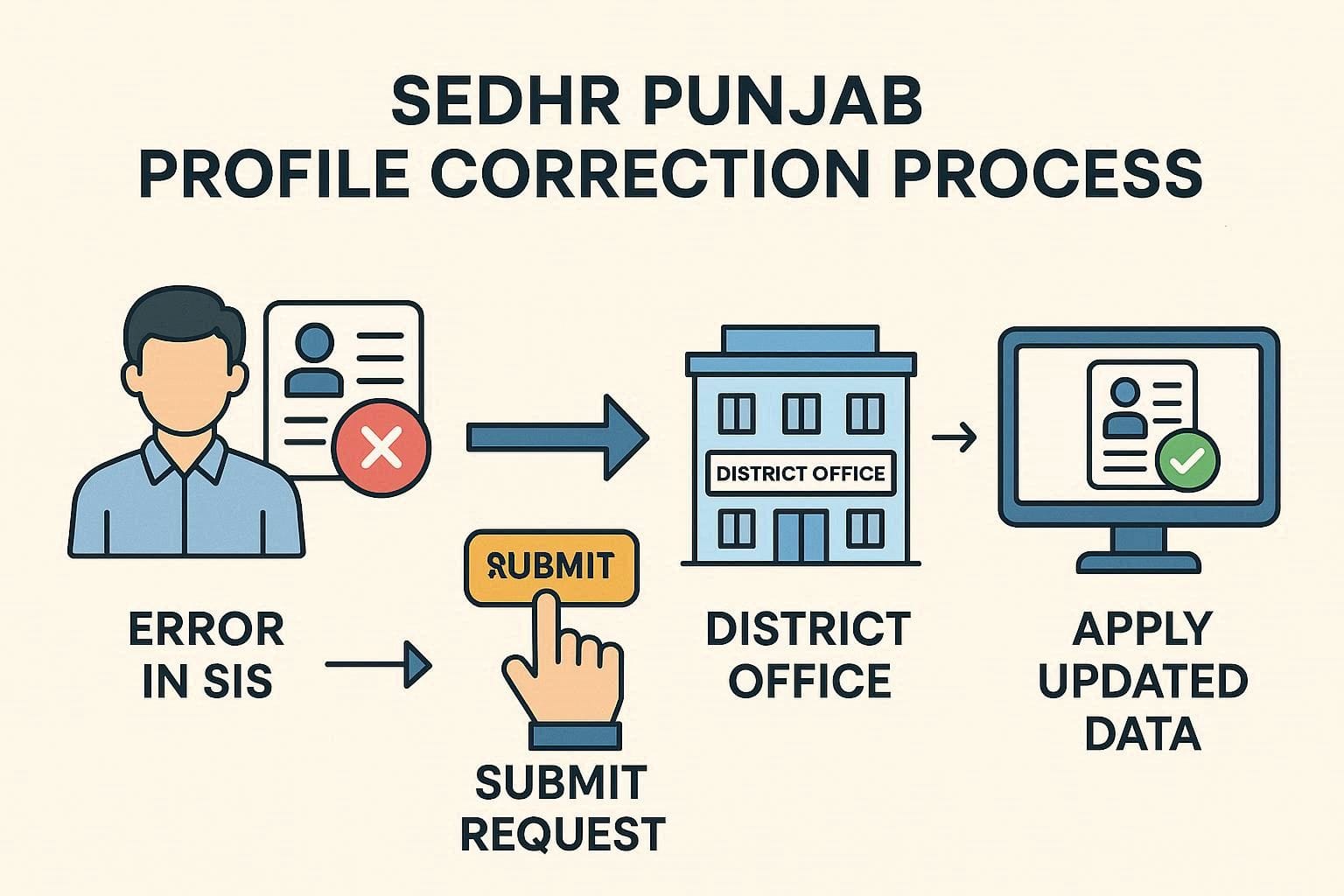
Profile correction means fixing incorrect personal or service data recorded in:
Sedhr Punjab (HRMS)
SIS (School Information System)
Sedhr only displays data — all corrections must be done through authorized officials.
Common Profile Errors in Sedhr Punjab
Teachers usually report these problems:
Wrong name spelling
Incorrect father’s name
Wrong CNIC
Incorrect date of birth
Old designation
Wrong school / posting
Incorrect date of appointment
Promotion not updated
📌 Even a small spelling mistake can block approvals.
Important Rule (Most Teachers Don’t Know)
❌ Teachers cannot edit profile data themselves in Sedhr.
✅ All changes are made via:
SIS Admin
District Education Office
Authorized HR staff
Sedhr updates automatically after SIS correction.
Step-by-Step: How to Apply for Profile Correction
Step 1: Identify the Exact Error
Login to Sedhr and note:
Incorrect field
Correct information
Screenshot (recommended)
Step 2: Check SIS Profile
Login to SIS
Verify if error exists there
📌 If SIS is wrong, Sedhr will also be wrong.
Step 3: Prepare Required Documents
Depending on correction type:
| Correction Type | Required Document |
|---|---|
| Name / Father Name | CNIC copy |
| Date of Birth | Matric certificate |
| Appointment Date | Appointment letter |
| Promotion | Promotion notification |
| Posting | Transfer order |
Step 4: Contact School Head / DDO
Submit written request
Attach verified documents
School head forwards case
Step 5: District-Level Correction
SIS operator updates data
Admin verifies documents
Data approved in system
Step 6: Sedhr Update
Sedhr syncs automatically
Update time: 24–72 hours
Profile Correction After Transfer
Very common issue:
Transfer approved
New school not visible
Old posting still active
Fix
Ensure Relieving + Joining marked in SIS
District admin must close old posting
📌 Sedhr reflects only active posting.
Promotion Data Not Updated in Sedhr
Why This Happens
Designation not changed in SIS
Promotion file incomplete
Pending approval stage
Solution
Submit promotion notification copy
Request designation update
Wait for system sync
Date of Birth Correction – Special Note
⚠️ DOB correction is highly sensitive.
Requires original documents
Higher-level approval
Longer processing time
📌 Never submit fake or altered documents.
How Long Does Profile Correction Take?
| Correction Type | Estimated Time |
|---|---|
| Name spelling | 1–3 days |
| Posting update | 2–5 days |
| Promotion | 3–7 days |
| DOB | Several weeks |
How to Check If Correction Is Done
Login to SIS
Confirm corrected data
Login to Sedhr
Verify service record
📌 Always check SIS first.
Frequently Asked Questions (FAQ)
Q1: Can I correct my profile online myself?
No. Only authorized staff can edit.
Q2: Why Sedhr still shows old data?
System sync delay or SIS not updated.
Q3: Can wrong profile block retirement?
Yes, absolutely.
Q4: Do I need to visit district office?
Often yes, especially for major corrections.
SEDHR Complete Beginners Guide:
Sedhr Punjab profile correction is not difficult — it’s just poorly explained online.
Once you understand:
Where data comes from
Who controls updates
Required documents
most issues get resolved smoothly.
📌 Save this guide — profile errors affect everything.